Crypto trading
Mark Price vs Last Price: Why a Stop Can Miss Liquidation
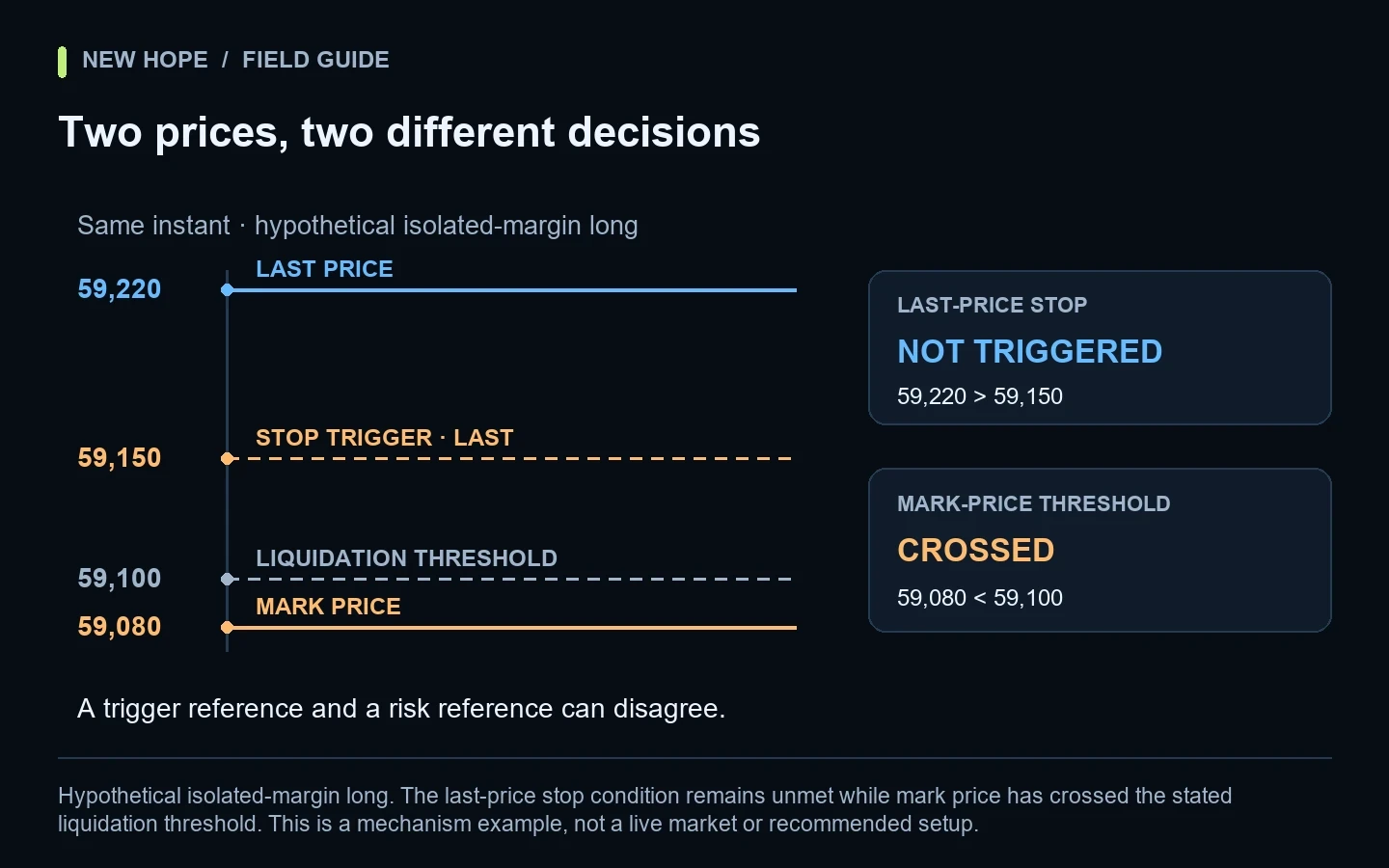
You open a crypto chart, see that the candle never reached your stop, and discover that a position has already been liquidated. Before assuming the chart or trading bot is broken, check which price each part of the system was watching. A perpetual contract can have a last traded price, an index price and a mark price at the same moment.
These are different measurements with different jobs. Understanding the distinction helps you read execution logs, configure alerts and ask the exchange the right questions. It does not make leverage safe or guarantee that a stop will execute before liquidation.
Hypothetical isolated-margin long. The last-price stop condition remains unmet while mark price has crossed the stated liquidation threshold. This is a mechanism example, not a live market or recommended setup.
Three prices on one market
Price | What it describes | Question to ask |
|---|---|---|
Last traded price | The most recent completed trade on that market | Is this what my chart and trigger use? |
Index price | An external reference constructed from spot-market sources | Which index and instrument specification apply? |
Mark price | A calculated reference used in derivatives risk calculations | How does my account use it for margin and liquidation? |
For its perpetual contracts, Bybit describes mark price as a calculated reference tied to a spot index and basis components. It is not simply a copy of the latest trade. The current formula is documented in Bybit’s mark-price explanation.
OKX also distinguishes the last execution from a calculated mark reference and documents an index-plus-basis construction. The exact implementation belongs to the venue and contract, so copying one exchange’s formula into another exchange’s monitoring system is a poor assumption. See OKX’s explanation.
A worked example: the stop is waiting for the wrong series
Consider a hypothetical long position in a linear perpetual contract. Its entry is 60,000, its quantity is 0.02 units, and its displayed isolated-margin liquidation threshold is 59,100. A stop has been configured to trigger when last price falls to 59,150. These figures are invented to illustrate the sequence; they are not a suggested leverage or stop setting.
Observation | Last price | Mark price | What the rules see |
|---|---|---|---|
Earlier snapshot | 59,400 | 59,360 | Both references remain above their stated thresholds |
Later snapshot | 59,220 | 59,080 | Last-price stop has not triggered; mark crossed 59,100 |
Looking only at 59,220, the trader might believe there is still room before either protective boundary. But the liquidation reference has already moved below 59,100. The stop condition and the risk condition can therefore disagree without either system misreading its own input.
For Bybit isolated margin, liquidation is triggered using mark price at the position’s liquidation price. Cross and portfolio margin instead depend on account maintenance-margin conditions; the displayed liquidation price can be a reference rather than a fixed trigger. Confirm the account-specific rules in Bybit’s execution and liquidation FAQ.
The difference also changes the number you see as unrealized P&L
For our simplified linear example, valuing the position at 59,220 gives (59,220 − 60,000) × 0.02 = −15.60 quote-currency units. Valuing it at 59,080 gives −18.40. The difference is 2.80 before fees or funding. These are two valuations of the same open exposure, not two executed closing trades.
This is why a screenshot of floating profit is incomplete evidence. Ask which reference created it and whether the figure includes costs. Our guide to balance versus equity explains the broader difference between realized results and the changing value of open positions.
Trigger price is not fill price
A conditional order has at least two stages: a rule becomes true, then an order must be processed. Specifying mark price as the trigger does not create a counterparty willing to trade at that exact mark. A market order still needs available liquidity; a limit order still has its price restriction.
Bybit’s API exposes different trigger references, including LastPrice, MarkPrice and IndexPrice, for supported derivatives conditions. It also has separate take-profit and stop-loss trigger fields. Inspect the actual submitted parameters rather than relying on the label of a saved preset. The fields are described in the order API documentation.
Here is a useful debugging separation: “The trigger fired at 10:00:00.100” is one fact; “the resulting order was accepted at 10:00:00.160” is another; “0.02 units filled at an average price of 59,030” is a third. Combining all three into “the stop price was 59,150” conceals the important part of the story.
Read limit versus market orders for bots for the execution distinction. Quantity and price validation can also prevent an intended order from being accepted; those checks are covered in minimum order size and tick steps.
Build a useful incident record
If a live event looks wrong, collect facts before changing settings. A chart image may use a different timezone, symbol or price series. Preserve the order identifier and the exchange timestamps, then align your own log with them. Avoid publishing API secrets, account credentials or personal identifiers when asking for assistance.
Record | Useful content | What it distinguishes |
|---|---|---|
Market identity | Exchange, exact contract, quote currency | One product from a similarly named spot pair |
Account context | Margin mode and position direction | Position threshold from account-wide risk |
Condition | Trigger reference, trigger price, order type | Activation from execution |
Timeline | Exchange event times and local receipt times | Market sequence from delayed delivery |
Outcome | Accepted, rejected, partial fill, fill or cancellation | Missing execution from a missing signal |
Do not reconstruct the incident from a single current account screen. Margin can change as other positions move, orders fill, funding is applied or collateral changes. A snapshot taken after the event may describe a different account state from the one that caused it.
What to check before enabling an automated strategy
Identify the exact market. Record whether the intended operation is spot, linear derivatives or another contract type.
Identify the reference for every condition. Entry, take profit, stop loss, alerts and account risk may not use the same series.
Review margin mode. Do not reuse a fixed-price assumption from isolated margin in an account-wide margin model.
Verify the resulting order. Confirm quantity, order type, closing behavior and acceptance, not just that a trigger was stored.
Test an abnormal sequence. Use a safe test environment to examine a price divergence, delayed update and partial fill.
Define a stop-and-review procedure. Decide who investigates a rejection, disconnect or unexplained exposure.
The objective is not to force all prices to be identical. It is to make each decision’s input visible. A dashboard that labels “last,” “mark” and “index” explicitly is easier to diagnose than one large number called “price.”
Three common mistakes
Placing a stop extremely close to the displayed liquidation level
The apparent gap may be smaller in the relevant reference series, and execution takes time. There is no universal safe percentage that works for every instrument, liquidity condition and account configuration. A risk review must consider the whole position and available margin, not only the visual spacing of two lines.
Changing trigger type without retesting the strategy
A rule researched on last-trade candles can produce a different event sequence on mark data. Changing the trigger changes the experiment. Save the old configuration, state the reason for the change and compare events on the correct data. The same discipline applies to tick and candle backtesting.
Treating a restart as a fresh account
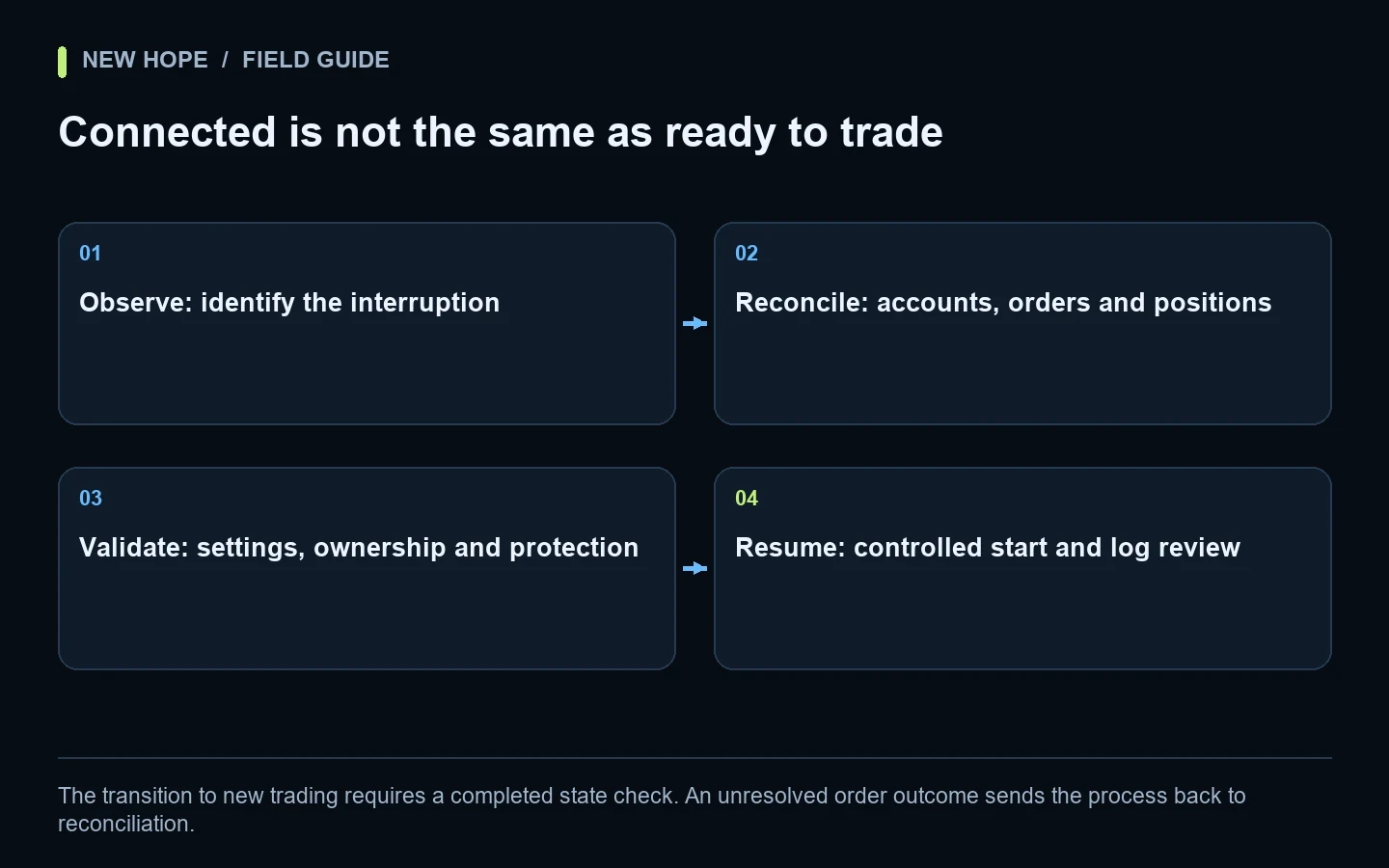
After a reconnect, open positions and exchange-side conditional orders may already exist. Reconcile them before issuing replacements. Our restart and recovery checklist explains how to avoid confusing a recovered session with a new strategy start.
Questions worth asking
Is mark price always more accurate than last price?
They answer different questions. The latest trade tells you where a trade occurred; a calculated reference supports other functions. Neither number guarantees that your whole order can execute at that level.
Will using mark price for my stop prevent liquidation?
No. It can align the trigger reference with a risk reference in supported configurations, but it cannot eliminate gaps, execution delays, rejection, insufficient liquidity or account-level margin changes.
How does this relate to New Hope Crypto?
New Hope Crypto automates strategy decisions involving volume-profile analysis, clustered levels and price movement. When discussing a deployment, confirm the exchange, supported market type and actual protection settings with the team. This article explains exchange mechanics; it does not claim that every described order feature is available in every New Hope configuration.
More articles