Crypto trading
Crypto Order Size: Tick Size, Quantity Steps and Minimum Value
A trading bot can have a valid signal, sufficient account funds and working API credentials, yet still receive an order rejection. The missing detail is often the exchange’s instrument specification. Prices and quantities live on permitted increments, and a separate minimum value may apply to the final order.
The useful question is therefore not just “how many coins can I afford?” It is “which permitted price and quantity express my intended trade without exceeding its limits?” This guide walks through that calculation using a hypothetical spot market. None of the sample settings should be copied into a live symbol configuration.
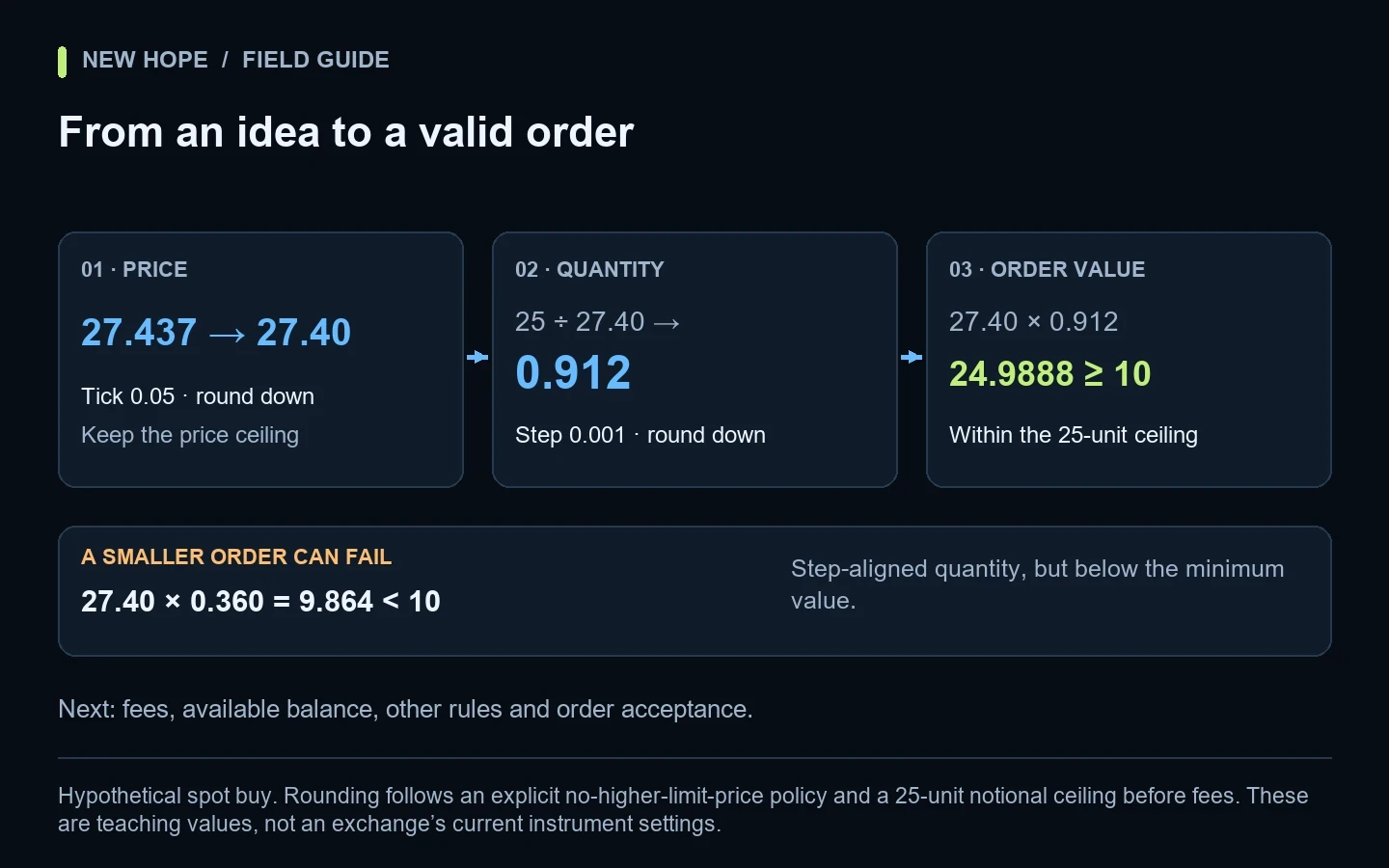
Hypothetical spot buy. Rounding follows an explicit no-higher-limit-price policy and a 25-unit notional ceiling before fees. These are teaching values, not an exchange’s current instrument settings.
The four checks people often mix together
Check | What it controls | Illustrative value |
|---|---|---|
Price tick | Permitted price increments | 0.05 quote-currency units |
Quantity step | Permitted quantity increments | 0.001 base units |
Minimum quantity | Smallest permitted quantity for the applicable rule | 0.001 base units |
Minimum notional | Smallest permitted order value under the applicable valuation rule | 10 quote-currency units |
Binance’s spot documentation distinguishes price filters, quantity filters and notional filters, with rules that can differ by order type. A minimum quantity is therefore not interchangeable with a minimum order value. Check the symbol’s current configuration in the official filter documentation.
A simple analogy is packaging. A shop might sell items in bundles of three and require an order of at least 20 currency units. Buying one bundle satisfies the bundle rule but may still fail the minimum checkout amount. Crypto order validation has the same need to satisfy several conditions together.
Worked example: a 25-unit limit-buy budget
Assume a hypothetical pair has a price tick of 0.05, quantity step of 0.001 and minimum notional of 10. You want a limit buy no higher than 27.437, with a maximum notional of 25 before fees. We also assume ordinary zero-aligned increments for this example; a real validator must follow the exact venue rules.
Step 1: apply the intended price policy
Valid prices nearby are 27.40, 27.45 and 27.50. Simply rounding 27.437 to two decimal places gives 27.44, which is not on the 0.05 grid. Because the instruction is “do not pay a higher limit price,” choose 27.40. Rounding to the nearest valid tick would instead choose 27.45 and would change that instruction.
The arithmetic is floor(27.437 ÷ 0.05) × 0.05 = 27.40. The rounding direction belongs to the order’s intent. A sell limit with a minimum acceptable price needs a different policy; blindly flooring every field is not a universal solution.
Step 2: calculate a quantity on the allowed grid
The unrounded affordable quantity is 25 ÷ 27.40, approximately 0.91240876. At a step of 0.001, rounding down gives 0.912. The new notional is 27.40 × 0.912 = 24.9888. It remains within the 25-unit ceiling and above the assumed 10-unit minimum.
Stage | Value | Reason |
|---|---|---|
Desired price ceiling | 27.437 | Strategy instruction |
Permitted limit price | 27.40 | Tick-aligned without raising the ceiling |
Permitted quantity | 0.912 | Step-aligned without exceeding the notional budget |
Final notional | 24.9888 | Recalculated after both adjustments |
This is only the notional calculation. Fees, reserved funds, other open orders and venue-specific balance requirements still need attention. A user who has exactly 25 units available should not assume that a 24.9888 notional is automatically affordable under every fee arrangement.
Step 3: examine a smaller order that fails
Now suppose the desired quantity is 0.360 at the same 27.40 price. It meets the 0.001 quantity step, but its notional is only 9.864. It fails our hypothetical 10-unit minimum. The smallest step-aligned quantity that reaches 10 is 0.365, producing 10.001.
That does not mean the bot should automatically increase every rejected order. If the risk budget permits only 9.90, moving to 10.001 violates the original limit. The correct outcome is to skip the order or ask for an intentional configuration change. Passing the exchange filter is not permission to exceed the strategy’s risk controls.
Where to read the current settings
Bybit’s instrument endpoint separates market categories. For linear and inverse contracts it documents fields including tickSize, qtyStep and minNotionalValue; spot has its own field structure. This distinction matters when one integration handles multiple products. See Get Instruments Info.
Coinbase Advanced Trade publishes product metadata including base increments, price increments and size limits. Treat these as product metadata rather than constants inferred from the number of digits displayed on a chart. The fields are listed in Get Product.
For an operator, the practical requirement is a visible specification snapshot: symbol, market type, retrieval time and the values used for validation. If an exchange changes an increment, you need to know whether the rejected request used yesterday’s rules or the newly retrieved ones. Repeatedly sending the identical invalid request only adds noise.
Why decimal places are not enough
A tick of 0.05 permits two decimal places but not every two-decimal number. A quantity step of 0.25 similarly permits 1.00, 1.25 and 1.50, but not 1.10. Formatting and validation are different tasks: displaying a value neatly does not prove that it belongs to the allowed grid.
For implementation, use decimal-safe arithmetic or scaled integers and keep the original values from the instrument specification. Binary floating-point calculations can produce tiny representation errors around a boundary. A value that visually reads 10.00 may be evaluated slightly differently if it is built through repeated approximate operations.
A useful test set includes the exact minimum, one increment below it, one increment above it and an off-grid value. Repeat those cases for both buy and sell intent. Tests should check the final request and its budget effect, not merely whether a formatting function returns the expected number of decimal digits.
Market orders and derivatives need their own checks
Our example uses a limit price that makes the illustrative notional easy to calculate. A market order may use a different exchange-defined reference for minimum-value validation, and its execution price is not known in advance. Do not assume that a spot limit-order formula covers every market order.
A derivatives quantity may represent contracts rather than the same base-asset unit used in a spot pair. Contract size, settlement currency and product category must therefore be explicit. For risk calculations, distinguish mark price from last price; for order behavior, review market and limit orders.
An operator’s rejection checklist
Save the exchange’s exact rejection code and message.
Confirm the symbol and market category, including spot versus derivatives.
Capture the instrument settings and when they were retrieved.
Compare the requested price and quantity with the permitted increments.
Recalculate order value after normalization.
Check remaining funds, reserved amounts, fees and strategy limits.
Inspect existing orders before retrying an uncertain request.
Record the final accepted request and any fill that follows.
A rejected order and an order with an unknown outcome require different handling. If the exchange explicitly rejects an invalid quantity, fix the cause. If a request times out after submission, first investigate whether it was accepted. The restart and recovery checklist covers reconciliation and helps separate an invalid request from an uncertain outcome.
Keep signal quality separate from execution quality
A volume-based signal can be well-defined while its order conversion is wrong. Conversely, a technically accepted order says nothing about whether the trading idea has an advantage. Keep separate logs for the observed market condition, intended exposure, normalized request and actual result.
Our POC, VAH and VAL worked example deals with the signal’s descriptive inputs. API-key permissions covers connection scope, and maker and taker fees covers a separate part of trading cost. Solving one of these layers does not automatically solve the others.
Common questions
Why is an order rejected when the account has enough money?
Balance is only one condition. The price or quantity can be off-grid, the order value too small, the market unavailable, or another applicable restriction unmet. Start with the exact rejection rather than assuming that more funds will solve it.
Should I always round the quantity up to the minimum?
No. Increasing quantity changes exposure. Recalculate the cost and risk, and reject the proposed trade if the smallest permitted order exceeds the allowed budget.
Does this describe New Hope Crypto’s internal algorithm?
No. These are exchange-validation concepts and an original teaching example. New Hope Crypto combines volume-profile analysis, price-level clustering and price movement. Before deployment, confirm the intended exchange, market and operating parameters with the team rather than treating sample numbers as product presets.
More articles