Execution & troubleshooting
Why a Trading Bot's Orders Are Rejected: A Diagnostic Guide
A connected trading bot is not necessarily allowed to place the order it has prepared. The account may be authenticated and quotes may be moving while the next request fails a price, volume, margin or session rule. Changing the strategy immediately can hide the real cause.
The fastest useful investigation starts with the response to one specific request. This guide uses MetaTrader 5 as the documented example, then shows a repeatable process for separating configuration problems from uncertain execution. Names displayed by another application may differ.
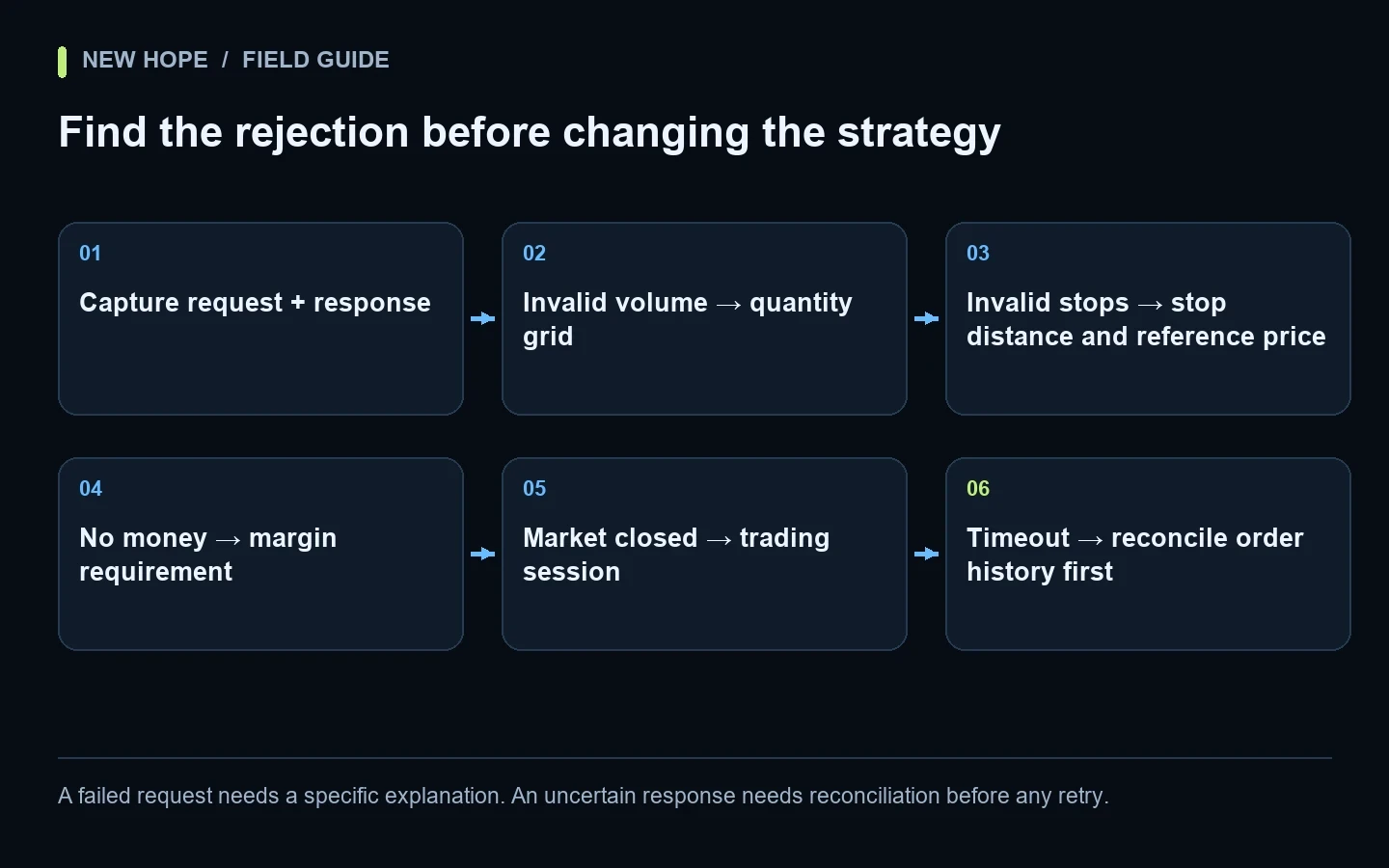
A failed request needs a specific explanation. An uncertain response needs reconciliation before any retry.
First separate “no signal” from “rejected order”
“The bot is not trading” describes an observation, not a diagnosis. It can mean that no entry condition occurred, the strategy was paused, no request left the application, a request was rejected, or an execution happened but was not reflected in the screen being watched.
Start with a narrow time window. Choose one event you can identify in a log. Write down what the application intended to do, whether it sent anything, and the response it received. A screenshot of an empty position list cannot answer those questions by itself.
Where requests reach MT5, MetaQuotes publishes trade-server return codes, including invalid volume (10014), invalid price (10015), invalid stops (10016), market closed (10018), insufficient funds (10019) and too many requests (10024). A code narrows the investigation; it does not justify changing unrelated settings.
Build a minimal evidence record
Field | Useful content |
|---|---|
Time | Exact timestamp and time zone |
Environment | Application build, broker server, demo/live, account mode |
Instrument | Exact symbol, including suffix |
Request | Side, volume, order type, intended price, SL and TP |
Response | Return code, full message, order or request identifier |
Account state | Existing positions, pending orders, relevant margin information |
Keep an original private copy and create a redacted copy for support. Remove passwords, API keys and other secrets. Do not replace the actual error with a paraphrase such as “connection failed”: the distinction between a rejected instruction and a missing response can determine the next action.
MT5 separates the Experts log from the platform Journal; older entries can be opened from saved log files. The official logging guide explains the locations and timestamp context. If the robot runs as a separate program, collect its corresponding log too.
Worked example: invalid volume
Suppose an illustrative instrument permits a minimum volume of 0.10 lots and increments of 0.10. A request for 0.15 is above the minimum, yet it does not fit the permitted increment. “Large enough” is only one validation condition.
Requested volume | Minimum check | Step check | Interpretation |
|---|---|---|---|
0.05 | Fails | Fails | Below the illustrative minimum |
0.15 | Passes | Fails | Not aligned with the 0.10 increment |
0.20 | Passes | Passes | Passes these two checks only |
This does not make 0.20 a recommendation. Increasing size to make an error disappear can change the user's exposure. The correct result may be to skip the trade or choose a suitable instrument and configuration after review. Maximum volume, aggregate limits and available margin may still prevent an otherwise aligned request.
MetaQuotes exposes distinct symbol properties for minimum, maximum and step volume, as well as price and stop constraints. Check the actual instrument's specification rather than copying values from another broker. See the symbol-property reference.
Worked example: invalid stops
Consider a simplified hypothetical check: the relevant current reference price is 1.10000, one point is 0.00001, and the required minimum stop distance is 30 points. A proposed protective level at 1.09980 is only 20 points away. In this simplified case, the distance test fails.
The arithmetic explains a diagnostic method, not a universal formula for every order. You must identify the relevant side of the quote, order type, permitted direction and current instrument rules. A comparison with an old screen price can be misleading if the quote changed before the request was validated.
Do not solve the problem by removing a protective order or widening it without reviewing the effect on risk. Record the invalid request, inspect the applicable constraint and ask whether the strategy's intended configuration can satisfy it. If the software uses an unexpected reference price or unit, that is an integration issue to resolve.
Use the response to choose the next check
Invalid price or stops: compare the submitted values, current quote and instrument specification. Check units and exact symbol.
Invalid volume: check minimum, maximum and increment separately, then relevant exposure limits.
Insufficient funds: review the account's margin requirement and existing commitments; do not assume a smaller visible balance number is the only cause.
Market closed: confirm the instrument's trading session, broker time and holidays.
Trading disabled: distinguish account permissions, platform automation controls and application state.
Too many requests: investigate the request pattern before adding more retries.
For exchange-connected software, a similar approach applies, but the rule names differ. The companion guide to crypto tick size, step size and minimum notional shows why quantity and order value require separate checks.
A timeout is not permission to send the same order again
A definitive rejection and an uncertain response are different cases. If an application does not receive a timely answer, the account may still have changed. Repeating an instruction blindly can turn an information problem into an unintended second order.
Use the available request or order identifier to inspect broker-side history and open orders. Establish whether the original instruction exists and what happened to it. The recovery procedure must match the connection and software; do not improvise a loop that repeatedly clicks the same trading button.
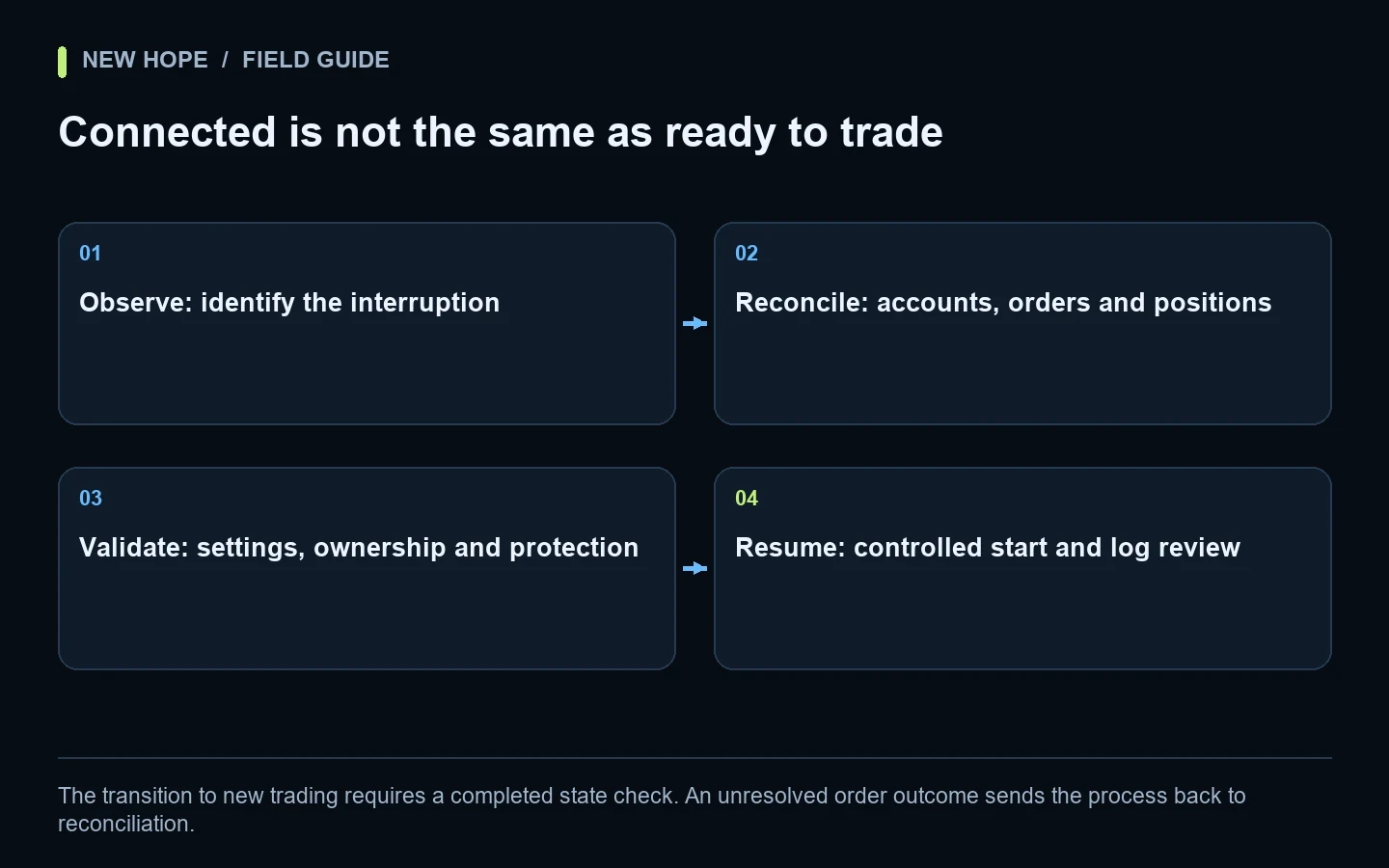
The restart checklist follows this order: reconnect, reconcile, validate, then resume. The broader execution audit separates submit, acknowledgement and fill events.
Prepare a useful support request
State the expected behavior in one sentence.
Provide the time window, version and exact instrument.
Include the rejected request and complete response, with secrets removed.
Attach the relevant instrument specification and account mode.
List the last configuration change, if any.
Describe whether the issue reproduced in an appropriate test environment.
Change one variable at a time during diagnosis. Otherwise, a successful next order will not explain which change mattered. Keep the failed case in the record: intermittent problems are much harder to investigate after the useful evidence has been overwritten.
Applying the checklist to NH PRO
Use the NH PRO setup guide to establish the correct connection and configuration first. The embedded product video is a general walkthrough; the error-code examples in this article come from platform documentation, not a claim that NH PRO displays those exact screens.
Prepared broker and instrument settings plus manager assistance are included with the full NH PRO package. The one-time $500, one-month evaluation contains the robot and instructions only. It excludes broker lists, prepared settings and help configuring profitable trading. See NH PRO package details before choosing a route.
Short answers
Does a working price feed prove that orders should be accepted?
No. Market data and trade permissions are separate parts of a connection. A valid quote does not override account or instrument constraints.
Should I keep retrying until an order goes through?
No. First distinguish a definite rejection from an unknown outcome, then follow the documented recovery procedure.
Can the same settings work on another MT5 account?
Possibly, but verify the exact server, symbol rules and hedging or netting mode. A shared platform name does not make accounts interchangeable.
Related video
Watch the referenced video on YouTube
More articles